Showing off your presentation slides with slideshare, PHP and a bit of JavaScript
First of all, I am a big fan of slideshare, a web app that allows you to upload presentations in powerpoint, open office or PDF and share it on the web. Slideshare converts the presentation (sadly enough not 100% when it comes to fonts and kerning :-( ) and people can comment on them, there is a text version of all slides and you can embed the slides in your blog or other sites. When I checked my slides I had a look at the API of slideshare but I am always a bit bored with having to go through a developer ID and then do everything on the server. That’s why I put on my “ethical hacker” hat and took a look at the RSS feed of my slides and found everything I need there! If you look at the source of the feed you’ll see that it contains not only the titles and descriptions but also the media code, in this case the HTML to embed the right flash movies. Taking this information it is pretty easy to build a viewer that allows people to click through all your presentations without having to leave your site. This can look something like this: 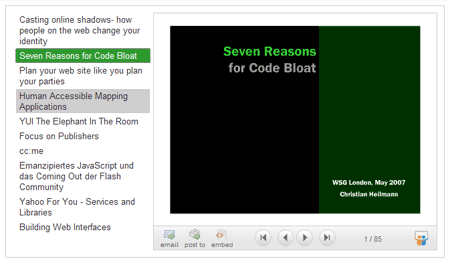 When JavaScript is available this will be the look and feel and functionality. When JS is turned off all you’ll get is an unstyled list of links pointing to the presentations on slideshare.net. You can check the slideshare show in action and get a zip to download and use on your site if you don’t want to know how it is done. If you do, read on… The code necessary is really easy and done in about 70 lines. Let’s go through it bit by bit. I am using PHP4 together with cURL, DOMXML and some JavaScript using the YUI.
URL we want to load and a CURL call to pull this file and store it in the variable $slides.
$slides = str_replace(‘slideshare:embed’,’slideshareembed’,$slides); $slides = str_replace(‘media:title’,’mediatitle’,$slides); $xml = domxml_xmltree($slides);
To make things easier (as DOMXML is a terribly hacky piece of kit – much easier with PHP5 and SimpleXML that one) I rename the namespaced attributes in the feed containing the embed code and the title of the media to simple elements and create an object collection from the XML using domxml_xmltree.
$json = array(); $slidesharelist = ‘’; $links = $xml->get_elements_by_tagname(‘link’); $img = $xml->get_elements_by_tagname(‘url’); $titles = $xml->get_elements_by_tagname(‘mediatitle’); $embeds = $xml->get_elements_by_tagname(‘slideshareembed’);
Then I need to preset an array to contain the embed code for each slides and a string to contain the list of links pointing to presentations on slideshare. I use the get_elements_by_tagname method of DOMXML to get arrays of the different bits of content that I need from the RSS feed.
foreach ($embeds as $key=>$el) { $l = $links[$key+2]->children[0]->content; $t = $titles[$key]->children[0]->content; $slidesharelist .= ‘- ’.$t.’ ‘; $emb = $el->children[0]->content; if(strpos($emb,’children[1]->content;} preg_match_all(‘/.(.).*/msi’,$emb,$obj); $json[]=’’’.$obj[1][0].’’’; } ?> By looping throught the “embeds” array I assembling a list of links pointing to the different presentations and add the embed code to the JSON array. I need this one later to show the different flash movies when visitors click the presentation links. Notice that I need to skip the first two LINK elements as that is the one pointing to the main URL of the RSS feed. For some reason the order of embeds was different on my localhost and my live server, which is why I added that extra if statement. Annoying, that. That is all the PHP we need! Now it is time to make it pretty and add the rest of the HTML.
@import 'slideshareshowstyles.css';
#slideshareshowslideshow{background:url(/2007/10/31/showing-off-your-presentation-slides-with-slideshare-php-and-a-bit-of-javascript/?php_echo_$img%5B0%5D) no-repeat center center;}
As it is hacky enough to mix PHP and JavaScript I put all the CSS fun in an own document and only add the logo of the RSS feed as the background of the slideshow container. The markup is a main DIV with an unordered list that gets the HTML assembled earlier in the PHP script. This shows the links but doesn’t do the dynamic showing yet. For that we need JavaScript.
YAHOO.example.slideshareshow = function(){
Technically we wouldn’t need the YUI for this, but I got quite used to its perks like namespacing and proper event handling without browsers hacks so I just went for it. I also started a namespaced function which uses the module pattern to contain all the variables inside its scope.
var container = document.getElementById('slideshareshow');
YAHOO.util.Dom.addClass(container,'jsenabled');
var list = document.getElementById('slideshareslides');
var links = list.getElementsByTagName('a');
I get the container element and add a CSS class called “jsenabled”. This allows me to use it as a hook in the CSS file to style only when JavaScript is available. I take the list and get all the links inside it.
var displayContainer = document.createElement('div');
displayContainer.id = 'slideshareshowslideshow';
container.appendChild(displayContainer);
var current = null;
I then create a new DIV that will contain the Flash movies of the different presentations when the user clicked a link. I give it an ID to allow for styling and append it to the main container element. I predefine “current” as “null”, this will later on be the currently selected link in the list.
for(var i=0;links[i];i++){
YAHOO.util.Event.on(links[i],'click',show,i);
}
I loop through all the links and add an event listener pointing to the show() method and sending the number of the link as a parameter. This allows me to get the correct Flash embedding code from the JSON array I assembled in PHP.
function show(e,i){
YAHOO.util.Dom.removeClass(current,'current');
current = this;
displayContainer.innerHTML = slides[i];
YAHOO.util.Dom.addClass(current,'current');
YAHOO.util.Event.stopEvent(e);
}
In the show method I remove the “current” CSS class (another hook for styling) from the last link that was clicked and set the new one as current. I set the innerHTML of the container DIV to the right code from the JSON array, add the “current” class to the link that was clicked and stop the link from being followed by invoking stopEvent. This is where the YUI Event utility rocks, I have the correct number to get as I sent it as an own object, I know which link was clicked as it is stored in “this” and I have the whole event object in e. What more do you need?
var slides=[];
}();
That’s all, except for putting the data from the RSS feed into a “slides” array and closing the module pattern. Together with the right style sheet this is enough to have a clickable list of your latest presentations on slideshare. Enjoy. [tags]domxml, hack, portfolio, presentation, rss, slideshare, workaround[/tags] Tags: domxml, hack, portfolio, presentation, rss, slideshare, workaround
``` Share on Mastodon (needs instance) Share on BlueSky
Newsletter
Check out the Dev Digest Newsletter I write every week for WeAreDevelopers. Latest issues: 237 🎂 20 years jQuery, 🔧 Claude’s fave tools & 🔒 safest job in AI! 20 years of ignoring the DOM, the tools agents pick, the true size of your country and dogs to adopt! Are you not entertained? ͏ ͏ ͏ ͏ ͏ ͏ ͏ ͏ ͏ ͏ ͏ ͏ ͏ ͏ ͏ ͏ ͏ ͏ ͏ ͏ ͏ ͏ ͏ ͏ ͏ ͏ ͏ ͏ ͏ ͏ ͏ ͏ ͏ ͏ ͏ ͏ ͏ ͏ ͏ ͏ ͏ ͏ ͏ ͏ ͏ ͏ ͏ ͏ ͏ ͏ ͏ ͏ ͏ ͏ ͏ ͏ ͏ ͏ ͏ ͏ ͏ ͏ ͏ ͏ ͏ ͏ ͏ ͏ ͏ ͏ ͏ ͏ ͏ ͏ ͏ ͏ ͏ ͏ ͏ ͏ ͏ ͏ ͏ ͏ ͏ ͏ ͏ ͏ ͏ ͏ ͏ ͏ ͏ ͏ ͏ ͏ ͏ ͏ ͏ ͏ ͏ ͏ ͏ ͏ ͏ ͏ ͏ ͏ ͏ ͏ ͏ ͏ ͏ ͏ ͏ ͏ ͏ ͏ ͏ ͏ ͏ ͏ ͏ ͏ ͏ ͏ ͏ ͏ ͏ ͏ ͏ ͏ ͏ ͏ ͏ ͏ ͏ ͏ ͏ ͏ ͏ ͏ ͏ ͏ ͏ ͏ ͏ ͏ ͏ ͏ ͏ ͏ ͏ ͏ ͏ ͏ ͏ ͏ ͏ ͏ ͏ ͏ ͏ ͏ ͏ ͏ ͏ ͏ ͏ ͏ ͏ ͏ ͏ ͏ ͏ ͏ ͏ ͏ ͏ ͏ ͏ ͏ ͏ ͏ ͏ ͏ ͏ ͏ ͏ ͏ ͏ ͏ ͏ ͏ ͏ ͏ ͏ ͏ ͏ ͏ ͏ ͏ ͏ ͏ ͏ ͏ ͏ ͏ ͏ ͏ ͏ ͏ ͏ ͏ ͏ ͏ ͏ ͏ ͏ ͏ ͏ ͏ ͏ ͏ ͏ ͏ ͏ ͏ ͏ ͏ ͏ ͏ ͏ ͏ ͏ ͏ ͏ ͏ ͏ ͏ 236: Load-bearing Verschlimmbesserung, Asteroids and Drive-bys… 235: Tokens vs. cost, the 1/3 AI web & a button to fix everything Why saving tokens still costs you, what language agents prefer, which VPN extensions to avoid and what your browser tells about you. ͏ ͏ ͏ ͏ ͏ ͏ ͏ ͏ ͏ ͏ ͏ ͏ ͏ ͏ ͏ ͏ ͏ ͏ ͏ ͏ ͏ ͏ ͏ ͏ ͏ ͏ ͏ ͏ ͏ ͏ ͏ ͏ ͏ ͏ ͏ ͏ ͏ ͏ ͏ ͏ ͏ ͏ ͏ ͏ ͏ ͏ ͏ ͏ ͏ ͏ ͏ ͏ ͏ ͏ ͏ ͏ ͏ ͏ ͏ ͏ ͏ ͏ ͏ ͏ ͏ ͏ ͏ ͏ ͏ ͏ ͏ ͏ ͏ ͏ ͏ ͏ ͏ ͏ ͏ ͏ ͏ ͏ ͏ ͏ ͏ ͏ ͏ ͏ ͏ ͏ ͏ ͏ ͏ ͏ ͏ ͏ ͏ ͏ ͏ ͏ ͏ ͏ ͏ ͏ ͏ ͏ ͏ ͏ ͏ ͏ ͏ ͏ ͏ ͏ ͏ ͏ ͏ ͏ ͏ ͏ ͏ ͏ ͏ ͏ ͏ ͏ ͏ ͏ ͏ ͏ ͏ ͏ ͏ ͏ ͏ ͏ ͏ ͏ ͏ ͏ ͏ ͏ ͏ ͏ ͏ ͏ ͏ ͏ ͏ ͏ ͏ ͏ ͏ ͏ ͏ ͏ ͏ ͏ ͏ ͏ ͏ ͏ ͏ ͏ ͏ ͏ ͏ ͏ ͏ ͏ ͏ ͏ ͏ ͏ ͏ ͏ ͏ ͏ ͏ ͏ ͏ ͏ ͏ ͏ ͏ ͏ ͏ ͏ ͏ ͏ ͏ ͏ ͏ ͏ ͏ ͏ ͏ ͏ ͏ ͏ ͏ ͏ ͏ ͏ ͏ ͏ ͏ ͏ ͏ ͏ ͏ ͏ ͏ ͏ ͏ ͏ ͏ ͏ ͏ ͏ ͏ ͏ ͏ ͏ ͏ ͏ ͏ ͏ ͏ ͏ ͏ ͏ ͏ ͏ ͏ ͏ ͏ ͏ ͏ ͏ 234: How X’s feed works, top 10 CI/CD risks & meat proxies How X promotes content, why web security is too hard, how not to be “meat proxy” and turning your terminal sessions into screenshots. ͏ ͏ ͏ ͏ ͏ ͏ ͏ ͏ ͏ ͏ ͏ ͏ ͏ ͏ ͏ ͏ ͏ ͏ ͏ ͏ ͏ ͏ ͏ ͏ ͏ ͏ ͏ ͏ ͏ ͏ ͏ ͏ ͏ ͏ ͏ ͏ ͏ ͏ ͏ ͏ ͏ ͏ ͏ ͏ ͏ ͏ ͏ ͏ ͏ ͏ ͏ ͏ ͏ ͏ ͏ ͏ ͏ ͏ ͏ ͏ ͏ ͏ ͏ ͏ ͏ ͏ ͏ ͏ ͏ ͏ ͏ ͏ ͏ ͏ ͏ ͏ ͏ ͏ ͏ ͏ ͏ ͏ ͏ ͏ ͏ ͏ ͏ ͏ ͏ ͏ ͏ ͏ ͏ ͏ ͏ ͏ ͏ ͏ ͏ ͏ ͏ ͏ ͏ ͏ ͏ ͏ ͏ ͏ ͏ ͏ ͏ ͏ ͏ ͏ ͏ ͏ ͏ ͏ ͏ ͏ ͏ ͏ ͏ ͏ ͏ ͏ ͏ ͏ ͏ ͏ ͏ ͏ ͏ ͏ ͏ ͏ ͏ ͏ ͏ ͏ ͏ ͏ ͏ ͏ ͏ ͏ ͏ ͏ ͏ ͏ ͏ ͏ ͏ ͏ ͏ ͏ ͏ ͏ ͏ ͏ ͏ ͏ ͏ ͏ ͏ ͏ ͏ ͏ ͏ ͏ ͏ ͏ ͏ ͏ ͏ ͏ ͏ ͏ ͏ ͏ ͏ ͏ ͏ ͏ ͏ ͏ ͏ ͏ ͏ ͏ ͏ ͏ ͏ ͏ ͏ ͏ ͏ ͏ ͏ ͏ ͏ ͏ ͏ ͏ ͏ ͏ ͏ ͏ ͏ ͏ ͏ ͏ ͏ ͏ ͏ ͏ ͏ ͏ ͏ ͏ ͏ ͏ ͏ ͏ ͏ ͏ ͏ ͏ ͏ ͏ ͏ ͏ ͏ ͏ ͏ ͏ ͏ ͏ ͏ ͏ 233: False AI predictions, hacked homelabs & designing with code How many times people predicted AI wrong, why “code was never the hard part” is an insult and how someone had their homelab hacked. ͏ ͏ ͏ ͏ ͏ ͏ ͏ ͏ ͏ ͏ ͏ ͏ ͏ ͏ ͏ ͏ ͏ ͏ ͏ ͏ ͏ ͏ ͏ ͏ ͏ ͏ ͏ ͏ ͏ ͏ ͏ ͏ ͏ ͏ ͏ ͏ ͏ ͏ ͏ ͏ ͏ ͏ ͏ ͏ ͏ ͏ ͏ ͏ ͏ ͏ ͏ ͏ ͏ ͏ ͏ ͏ ͏ ͏ ͏ ͏ ͏ ͏ ͏ ͏ ͏ ͏ ͏ ͏ ͏ ͏ ͏ ͏ ͏ ͏ ͏ ͏ ͏ ͏ ͏ ͏ ͏ ͏ ͏ ͏ ͏ ͏ ͏ ͏ ͏ ͏ ͏ ͏ ͏ ͏ ͏ ͏ ͏ ͏ ͏ ͏ ͏ ͏ ͏ ͏ ͏ ͏ ͏ ͏ ͏ ͏ ͏ ͏ ͏ ͏ ͏ ͏ ͏ ͏ ͏ ͏ ͏ ͏ ͏ ͏ ͏ ͏ ͏ ͏ ͏ ͏ ͏ ͏ ͏ ͏ ͏ ͏ ͏ ͏ ͏ ͏ ͏ ͏ ͏ ͏ ͏ ͏ ͏ ͏ ͏ ͏ ͏ ͏ ͏ ͏ ͏ ͏ ͏ ͏ ͏ ͏ ͏ ͏ ͏ ͏ ͏ ͏ ͏ ͏ ͏ ͏ ͏ ͏ ͏ ͏ ͏ ͏ ͏ ͏ ͏ ͏ ͏ ͏ ͏ ͏ ͏ ͏ ͏ ͏ ͏ ͏ ͏ ͏ ͏ ͏ ͏ ͏ ͏ ͏ ͏ ͏ ͏ ͏ ͏ ͏ ͏ ͏ ͏ ͏ ͏ ͏ ͏ ͏ ͏ ͏ ͏ ͏ ͏ ͏ ͏ ͏ ͏ ͏ ͏ ͏ ͏ ͏ ͏ ͏ ͏ ͏ ͏ ͏ ͏ ͏ ͏ ͏ ͏ ͏ ͏ ͏
My other work:
- The Developer Advocacy Handbook
- Buy it on Amazon
- Buy it on Leanpub
- Skillshare Classes:
- Tools and Tips to Optimize Your Workflow as a Developer
- Tools for Improving Product Accessibility
- The JavaScript Toolkit: Write Cleaner, Faster & Better Code
- Demystifying Artificial Intelligence: Understanding Machine Learning Skip to search
- About this
- Archives
- Codepo8 on GitHub
- Chris Heilmann on BlueSky
- Chris Heilmann on Mastodon
- Chris Heilmann on YouTube Christian Heilmann is the blog of Christian Heilmann chris@christianheilmann.com (Please do not contact me about guest posts, I don’t do those!) a Principal Program Manager living and working in Berlin, Germany. Theme by Chris Heilmann. SVG Icons by Dan Klammer . Hosted by MediaTemple. Powered by Coffee and Spotify Radio. Get the feed, all the cool kids use RSS! {“prefetch”:[{“source”:”document”,”where”:{“and”:[{“href_matches”:”/”},{“not”:{“href_matches”:[“/wp-.php”,”/wp-admin/”,”/wp-content/uploads/”,”/wp-content/”,”/wp-content/plugins/”,”/wp-content/themes/yuiminimal/”,”/\?(.+)”]}},{“not”:{“selector_matches”:”a[rel~="nofollow"]”}},{“not”:{“selector_matches”:”.no-prefetch, .no-prefetch a”}}]},”eagerness”:”conservative”}]} (function(i,s,o,g,r,a,m){i[‘GoogleAnalyticsObject’]=r;i[r]=i[r]||function(){ (i[r].q=i[r].q||[]).push(arguments)},i[r].l=1*new Date();a=s.createElement(o), m=s.getElementsByTagName(o)[0];a.async=1;a.src=g;m.parentNode.insertBefore(a,m) })(window,document,’script’,’//www.google-analytics.com/analytics.js’,’ga’); ga(‘create’, ‘UA-59530505-1’, ‘auto’); ga(‘send’, ‘pageview’); const button = document.querySelector(‘.tootshare’); if(button) { if(localStorage.getItem(‘mastodon-instance’)) {button.querySelector(‘span’).remove();} button.addEventListener(‘click’, (e) => { if(localStorage.getItem(‘mastodon-instance’)) { button.href = button.href.replace(“mastodon.social”, localStorage.getItem(‘mastodon-instance’)); } else { e.preventDefault(); let instance = window.prompt(‘Please tell me your Mastodon instance’); localStorage.setItem(‘mastodon-instance’, instance); button.querySelector(‘span’).remove(); } }); }